Posts


Canon Pixma MP198

Image
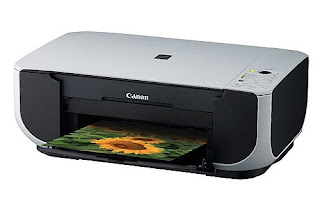
Pixma MP198,stylish & compact all-in-one photo printer Features Print • 2pl (min) ink droplets and 4800 x 1200 dpi (max) resolution • Print speed: 19ppm mono / 15ppm colour • 4" x 6” (4R) borderless photo in approx. 70 sec • Capable of printing borderless photos up to A4 size • ChromaLife 100 technology – photos can last up to 100 years Scan • 600 x 1200 dpi CIS • Advanced Z-Lid to scan thick and bulky originals Copy • Copy speed: 19cpm mono / 14cpm colour ...

Driver Compaq Cq35-104TU for Windows 7

Image
If you need the driver for Compaq CQ35-104Tu for Windows 7,these the links: Mobile Intel 4 Series Express Chipset Family Graphics Driver ftp://ftp.hp.com/pub/softpaq/sp44501-45000//sp44971.exe Software Support for HP Integrated Module with Bluetooth Wireless Technology ftp://ftp.hp.com/pub/softpaq/sp39501-40000/sp39616.exe Cyberlink Youcam Software ftp://ftp.hp.com/pub/softpaq/sp42501-43000/42568.exe HP ProtectSmart Hard Drive Protection ftp://ftp.hp.com/pub/softpaq/sp45501/sp45501.exe HP DVD Play ftp://ftp.hp.com/pub/softpaq/sp45501-46000//sp45648.exe HP Quick Launch Button ftp://ftp.hp.com/pub/softpaq/sp46001-46500//sp46168.exe

Resetting Printer Canon MP145 & MP160

Image
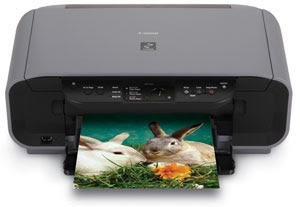
Procedure to reset Printer canon MP145 and Canon MP160 with Error Code Message for Printer Canon MP145 and Canon MP160, you can find error code message the end of this post: 1) With the printer powered off but connected to a power source, press the Power button while pressing and holding the Stop/ Reset button. 2) When the Power is lit, press the Stop/Reset button two times while pressing and holding the Power button. 3) When releasing the Power button and the Stop / Reset button (regardless of order), the printer will move into a service mode. (Waiting for menu selection) 4) When the on/off lights in green, press the Stop/Reset button the specified number of time(s) according to the function listed in the table below.(Each time the Stop/Reset button is pressed, the LED lights alternately in orange and green, starting with orange.)note: press 4 times for waste ink counter reset. The number of the Reset button pressing LED Function Remarks 0 time Green Power off 1 time Orange Service p...

Resetter Canon Pixma IP1880 & IP 1980

Image
Simple way to reset Canon IP 1880 & IP 1980,just following these steps: 1. Press Resume button ( hold for 1 - 2 minutes ). 2. Open the cover. 3. Release the catridge and then put them on again. 4. Close The Cover... 5. Turn Off, then Turn On. To reset blinking lamp or waste ink counter by using General tool from this link http://www.ziddu.com/download/7737091/Software_Resetter_CanoniP1900.zip.html

Resetter / adjustment program for Epson T10/T11/T20

Image
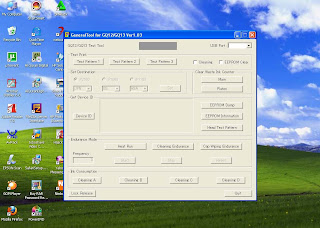
You can download the driver from here. If you need this resetter,you can download from here. or from www.indoreset.blogspot.com Thanks to Orthotomine and Serkan for cracking them...

Printer Epson T11

Image
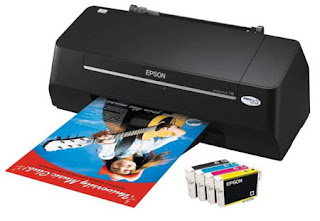
New generation inkjet printer Epson was released,Epson T11. A4, 22ppm/13ppm (b/c), 4-individual unk, 5760x1440 dpi resolution, USB 2.0 Full speed, Windows & Mac support. Printing Feature : - Printing Technology On demand inkjet (piezoelectric) - Print Head Epson Piezo - INK Epson Durabrite Ultra Ink - Resolution Up to 5760x1140 dpi (with VSDT) - Minimum ink droplet volume 4ml - Print speed Black text memo A4 approx 22 ppm (draft); colour text memo A4 Approx 13ppm (draft); Photo 10x15cm/ 4x6-inch approx 156ppm (Borderless) Input Data Buffer : 32 KB Interface & connectivity - High speed USB 2.0 - compatible with USB 1.1 specification Paper Handling : - Paper feed method Friction feed - Paper hold capacity input 80-sheets, A4 Plain paper - Paper Size A4, A5, A6, B5, Letter, Legal, 5R (5x7"), 4R (4x6"), envelopes, no. 10, DL, C6 - Maximum Paper thickness 0.33mm (epson genuine media only Colour Matching : - ICM Profiles (Windows) - Adobe RGB (Windows & Mac) - ColorSync...

Setting GPRS All Operator GSM Indonesia

Setting GPRS All Operator GSM Indonesia 3 (Three) Way of Activation :Active automatic at the time of registration and will be sent setting OTA as according to type of your handset. Following setting manual : GPRS/WAP APN : 3gprs username : 3gprs password : 3gprs IP address: 10.4.0.10 WAP homepage : http://wap.three.co.id/ HTTP port setting : 3128 MMS APN : 3mms username : 3mms password : 3mms mms gateway IP address: 10.4.0.10 MMS server address : http://mms.three.co.id/ HTTP port setting : 3128 So you connection to PC, Input of Extra Settings AT+CGDCONT=1,"IP","3gprs" Telkomsel Way Of Activation GPRS/MMS : Halo Card Enlist in GRAPARI or type sms "GPRS" sent to 6616 and "MMS" to 6616 SIMPATI Type sms " GPRS " send to 6616 and "MMS" number code of behind simcard SIMPATI and send to 6616 Following setting manual : GPRS/WAP 1. APN : telkomsel (wap), internet (general) 2. Username : wap 3. Password : wap123 4. WAP Gateway IP Addres...