Posts


Download Driver Compaq 510 for Windows 7
Image
- IDT High-Definition (HD) Audio Driver v6.10.6222.0 - Graphics Intel Video Driver v8.15.10.1825 - Synaptics TouchPad Driver v13.2.6.2 - HP Quick Launch Buttons v6.50.4.2 - HP Universal Camera Driver v1.00 H4 - LSI High-Definition Audio (HDA) Modem Driver v2.1.94.0 - Intel PRO/Wireless Drivers v13.0 - Broadcom Wireless LAN Driver v7 5.30.21.0 - Software Support for HP Integrated Module with Bluetooth Wireless Technology - Marvell Yukon Gigabit Ethernet Controller Driver v10.70.5.3 - HP Wireless Assistant v3.50.9.1
How To Reset Epson R230X

Image
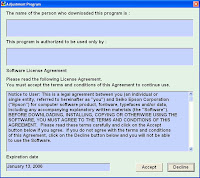
1. Download this tool Epson R230 Adjustment , ekstract winrar to your PC and run it. 2. Before you select accept, Change the settings on your computer time prior to the date of 13 January 2006. 3. If time on the pc you've changed, run the application above, and select accept, and will appear beside the display. 4. Select Mode Name, Match your printer will reset , so also just USB Port Selection Select 001 (Stylus Photo R230), and lastly select Destinations La tin / Usa, or Asia, it's up to you. 5. Appears it will be the next display and select Maintenance, check the waste ink pad counter button, continue to select the reset, if it already appears succesful. 6.Turn Off a few minutes,and then turn On again

Reset Counter Canon Ip2770

Image
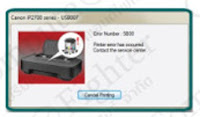
1. When the counter nearly full,an orange light blinks on the RESUME button 8 times. Switch to green power button one time,press a RESUME button. The printer are working then.But if the counter is full a light on the power and Resume will flash alternately. It will show "error number : 5B00" on the screen. 2. Connected POWER and USB line before the reset. 3. Download this tool or visit www.compute.co.th 4. After downloading,you will get a file "ip2770.doc" but you have to change the file name extension from ".doc" to ".exe" 5. Double clicks on file ip2770.exe 6. Notice at the usb port,it must be the same number as a printer's driver. You can check it by go to Control Panel --->Printers and Faxes ----> Canon IP2770 then right click and choose printer properties then choose Port as the picture After checking the same port. Then go to services mode and follow the steps Turn of without pull the AC power line out,wait until a printer...

Driver Axioo Pico DJH615 for Windows 7

- Wlan driver download http://www.ziddu.com/download/10258237/Wlanforwin7.rar.html - Webcam driver download http://www.ziddu.com/download/10258365/webcamdriver.rar.html

Driver Toshiba A135-S4827 for XP

Image
- Driver Chipset download - Driver Vga download - Driver Sound download - Driver Modem download - Driver Lan download - Driver Wireless download - Driver Card Reader download reference v8-240z.com

Driver Dell Inspiron Mini 910 for Windows Xp

Image
Dell Inspiron Mini 910 come with Windows 7 Starter edition,if you want to setup Windows Xp,you may need these drivers : - Driver Chipset ftp://ftp.us.dell.com/chipset /r192574.exe - Driver Video ftp://ftp.us.dell.com/video/r192572.exe - Driver Audio ftp://ftp.us.dell.com/audio/r197392.exe - Driver Network ftp://ftp.us.dell.com/network/r197393.exe - Driver Wireless ftp://ftp.us.dell.com/network/r197390.exe - Driver Bluetooth ftp://ftp.us.dell.com/network/r197346.exe - Driver Bluetooth ftp://ftp.us.dell.com/network/r197346.exe - Battery meter setup ftp://ftp.us.dell.com/app/r192569.exe - Webcam Application for Netbook download part1 , part2 , part3

How To Reset / Clear Counter MP258

Image
1.Connected POWER and USB before reset processing 2.Download this tool or visit www.compute.co.th 3.After download is completed.You have to change a file name extension from ".doc" to ".exe" 4.Turn of the printer,wait until it stop working. 5.Press the STOP/RESET button,then press the POWER button and hold more seconds, 6.After that press the STOP/RESET button twice still press hold POWER button. 7.There after leave out from both of buttons to approach SERVICE MODE 8.Double click on the file MP258.EXE 9.It will looks like the picture,after that insert of piece of paper & press the MAIN button once,wait until printing out of paper. 10.Press an EEPROM CLEAR button to CLEAR EEPROM,after that one more paper and press an EEPROM button,then printer will be printed EEPROM to 11.When the process was completed,turn it off and turn on again. taken from www.compute.co.th